Question types |
|
Statistieken worden van de volgende soorten vragen gegenereerd: |
- For multiple choice questions Formdesk reports the number and percentage of each chosen option.
- For Check box questions the percentage and number is displayed for the times the check box has been selected.
- For calculations and questions requiring a numeric response the average value is displayed.
|
|
|
Adding / removing items |
|
By default, all questions capable of processing statistical data are included in the statistics report. Because this is not always desirable, Formdesk allows you to remove questions from your report.
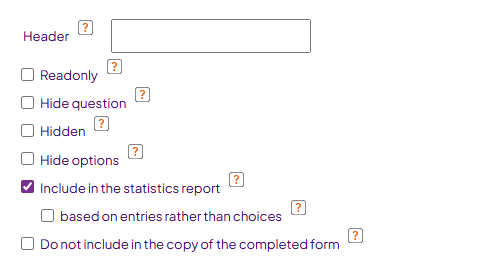
Non question- items, such as images and text items, can also be added to the report. This can be done for each item while adding / editing this item: |
 |
|
|
Bar graphs |
|
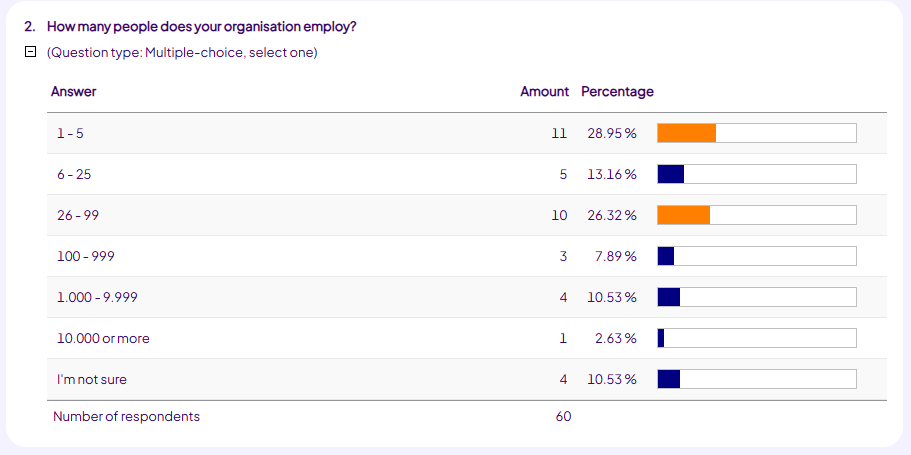
The colours of the bar graph change when a certain percentage is reached.
Every 20 % the colour will change, as displayed below. |
 |
|
|
Filters |
You can use filters to limit your publication. This is very useful if you want to create multiple different publications of the same form. Filters are set on the results overview screen.
To use a filter add '&filter=filtername to the URL of your publication. A complete URL to a publication that uses a filter may look like: www.formdesk.com/your_foldername/formname?stats&filter=filter1. The filter used in the URL may not contain a [space] in its name.
|
|
|
Dependencies |
|
Questions that are hidden or disabled using Dependencies do not count towards the answered questions. Because of this, your answer percentage may be lower than 100%.
|
|
|
|
|
|
|
|