What does the PDF generator do? |
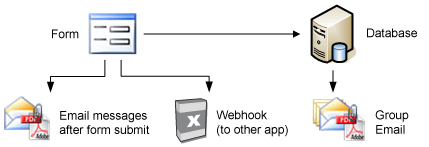 |
You can setup PDF document to be sent along with email messages or the webhook:
The email Notification
The email that you receive if someone submits your form.
The PDF generator allows you, for example, to attach a PDF document to your email notification that enables you to print the completed form on a single page.
The Auto Responder
The (confirmation) email that is being sent to your form's respondent.
The PDF generator allows you, for example, to attach an invoice or contract to your confirmation email. Another example would be to attach a PDF confirmation of the completed form to be printed singed and mailed. You will always receive the completed form in exactly the same layout no matter what platform your respondent is using.
Enter you email address in our sample form to receive an email message with your registration attach as a PDF document.
The Group email
The email that you can sent to anyone that ever submitted his/her email address in your form.
You could use the PDF generator to send an email message to all (or a selection of) your respondents containing a contract or invoice for the new membership term.
Also Workflow messages and Webhooks support the creation of pdf documents. |
|
|
Designing your PDF document |
|
When setting up one of the email messages mentioned above or when setting up a webhook you will find an icon 'PDF attachment'. |
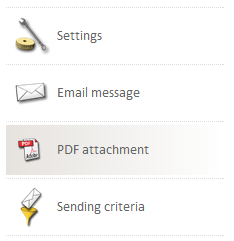 |
You can setup a PDF document with Formdesk the same way you create HTML messages.
The PDF document may contain Merge Codes. This allows you, for example, to include the completed form within the PDF document.
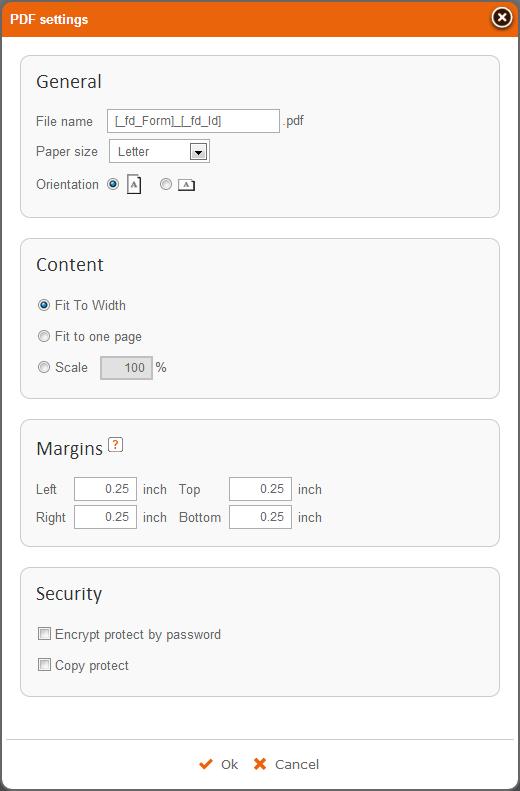
When setting up your PDF document you can set the paper size, the Print Orientation (portrait or landscape) and the Scale percentage or auto-fit it to the width or a single page.
If you have a business account or if you have purchased the addtional Secure Data Transfer feature you will also be able to encrypt and password protect the PDF document.
A predefined item 'Page break for printing' can be used to force a page break in your pdf document. You need to insert this item in your form but it will only effect a printed or pdf document. |
 |
|
|
Page breaks:
If you want to force a page break on a certain line in your PDF document then click the bottom tab HTML, search the position you want the page break and add the following line:
<div style="page-break-after:always; height:15px"></div>
If you use the system code [_fd_CompletedForm] to show the completed form and you want to force a page break at a certain line within the completed form you can place the code above in the form (Question tab) in a Text item. For your convinience this item is also available as a predefined item. The code will not be visible for your users during the completion of the form. |
|
|
|
|
|